


Track123 vs TrackingMore (2026): The Shipment Tracking API That Costs Less as You Grow
If you're evaluating shipment tracking APIs, TrackingMore is almost certainly on your list. It's been around since 2012, covers a wide range of carriers, and is well-known in the logistics tech space. So why are more and more high-volume teams choosing Track123 instead?
The answer isn't one thing — it's a pattern. As your shipment volume grows, the differences in pricing structure, API reliability, and data freshness that seemed minor at first start compounding into real costs. This article breaks down exactly where those differences show up, with real numbers.
Pricing: Three Ways Track123 Wins at Scale
1. Lower price at every comparable volume tier
Let's start with the number that matters most: what you actually pay each month.
At 10,000 shipments/month — a realistic volume for a growing brand or mid-size 3PL — Track123 costs $179/month. TrackingMore costs $279/month. That's $100/month more for the same shipment quota. Over a year, that's $1,200 that could go back into your logistics operations, your team, or your growth budget.
And the gap doesn't close at higher volumes. Here's how the two platforms compare side by side:
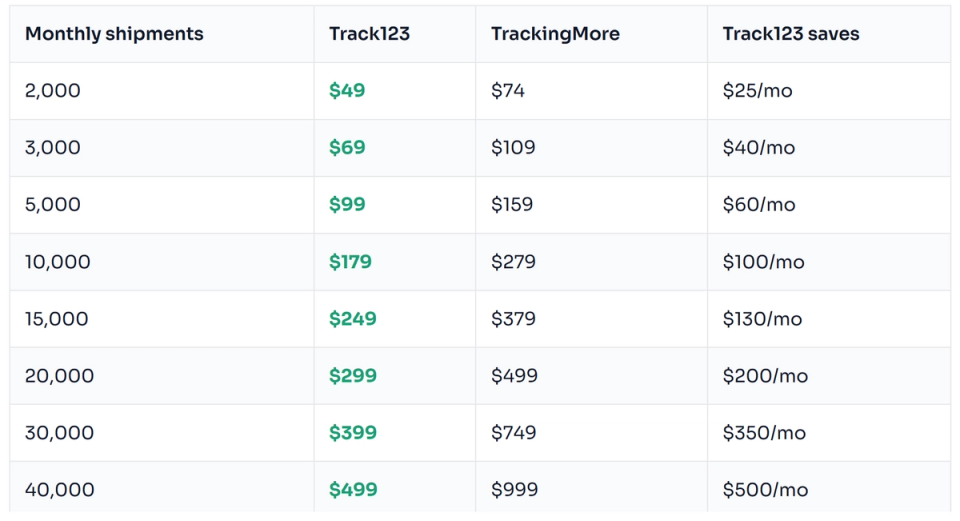
At 30,000 shipments/month, Track123 is $350/month cheaper — that's $4,200/year. At 50,000 shipments, the gap reaches $650/month, or $7,800/year. The higher your volume, the more the pricing difference compounds.
2. Half the overage rate when you exceed your plan
Every high-volume operation has peak months — Black Friday, the holiday rush, a viral product launch. When shipments spike past your plan limit, what your tracking provider charges per extra shipment determines how expensive that growth actually is.
Track123 charges $0.02 per extra shipment on its advanced plan. TrackingMore charges $0.04 per extra credit — twice as much, across every paid tier.
What this looks like in practice: During a peak month where you process 20,000 shipments above your plan limit, TrackingMore charges $800 in overages. Track123 charges $400. That's $400 in a single month — just from overflow traffic. For teams that regularly hit peak seasons, this difference is not a rounding error.
The base plan is what you budget for. The overage rate is what surprises you. Track123's rate is consistently half of TrackingMore's at every volume level.
3. More plan tiers — so you never pay for quota you don't need
TrackingMore's plan structure has a hidden cost that most teams don't notice until they hit it: the platform simply doesn't offer plans at certain volume levels. There's no plan for 7,000 shipments. No plan for 25,000. No plan for 35,000 or 45,000.
If your operation sits at one of those volumes, you have two choices: pay for a plan that's smaller than what you need, or upgrade to the next tier and pay for quota you'll never use.
Track123 offers plans at 2K, 3K, 5K, 7K, 10K, 15K, 20K, 25K, 30K, 35K, 40K, 45K, and 50K shipments. You pay for what you actually use — not the nearest round number that happens to be on TrackingMore's pricing page.
API Reliability and Developer Experience
The 120-second freeze that hits when you can least afford it
Every API has rate limits. That's expected. What matters is what happens when you hit them.
TrackingMore's documentation states explicitly: when your system receives a 429 rate limit error, it must stop all requests and wait 120 seconds before retrying. Two full minutes. Not a suggested back-off window — a hard requirement baked into their API contract.
For most use cases, this never comes up. But for teams running large batch jobs — syncing tens of thousands of shipment statuses overnight, ingesting a day's worth of orders in a processing window, or handling the surge that follows a flash sale — 429 errors are not edge cases. They're a predictable part of operating at volume.
Track123 has no mandatory hard-wait window after rate limit errors. Your system can implement whatever retry strategy makes sense for your architecture — exponential backoff, queue-based retries, whatever fits. You're not locked into a platform-mandated 120-second pause.
Code snippets in 15+ languages — no SDK required
Track123's API documentation includes an interactive "Try It" tool — fill in your API key and parameters directly in the docs, click the button, and get a live response immediately. No Postman, no local setup required. The docs also auto-generate ready-to-use code snippets in 15+ languages: Shell, Node.js, Ruby, PHP, Python, Go, Java, JavaScript, C, C#, and more. For most teams, this covers the same practical need as a traditional SDK — copy the snippet, paste it into your codebase, and you're done.
TrackingMore provides official downloadable SDKs in 7 languages, which some teams may prefer as a versioned library dependency. But for developers who simply want to get up and running quickly without adding a new dependency, Track123's interactive docs with multi-language snippets are equally effective — and faster to start with.
Data that's up to 3 hours fresher — and why that matters for your support team
Track123 syncs carrier data every 3 hours, across all carrier types. TrackingMore refreshes every 4–6 hours for standard carriers — and extends to 6 hours for postal services like USPS, China Post, and Japan Post.
On any given shipment, that's a gap of 1–3 hours. It sounds small until you think about what happens inside that window.
A package gets marked "delivered" at 11am. On Track123, that status is visible to your customer by 2pm. On TrackingMore, it might not appear until 5pm — or later if it falls in a postal carrier's 6-hour cycle. In the meantime, the customer has already opened a support ticket asking where their package is. Your support agent has already spent 5 minutes looking it up and replying. That interaction cost real time and real money.
Multiply that across thousands of shipments, and the 3-hour difference in refresh frequency translates directly into support ticket volume. Fresher data means fewer contacts, not just a better dashboard number.
The same logic applies to exception detection. When a shipment stalls, enters an exception state, or gets flagged as lost, catching it 3 hours earlier means your ops team can intervene before the customer notices — not after they've already complained.
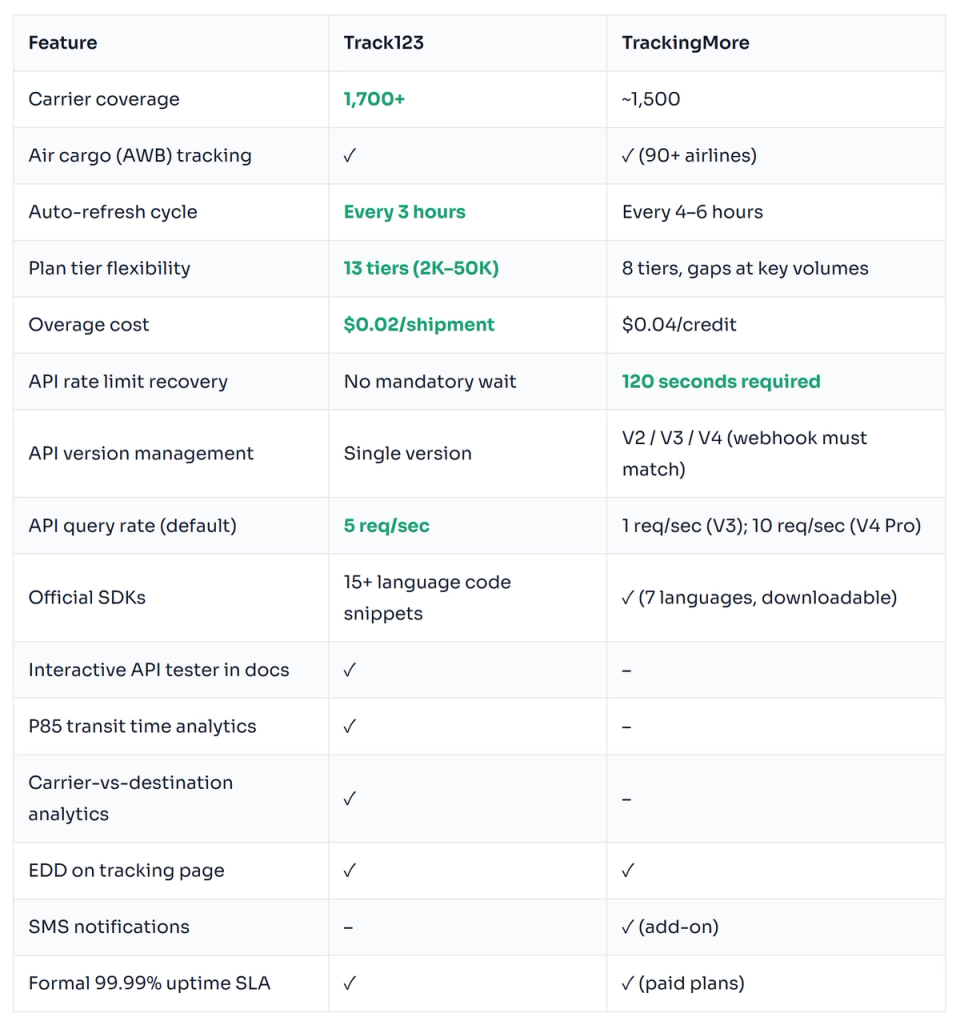
Full Feature Comparison
Who Should Use Each Platform?
Choose Track123 if:
- Your volume regularly exceeds plan limits during peak seasons — at half the overage rate, the savings compound fast
- Your shipment volume doesn't fit neatly into TrackingMore's coarse plan tiers — Track123 has a tier for almost every volume level
- You're running batch processing jobs or high-frequency API workloads that can't afford a 120-second freeze on rate limit errors
- Fresher tracking data matters for your support team's response time or your exception detection workflows
- You need maximum carrier coverage — 1,700+ carriers including regional networks in Southeast Asia, Latin America, and Eastern Europe
- You want P85 and per-carrier-per-destination analytics to drive carrier optimization decisions
Choose TrackingMore if:
- Your engineering team prefers a versioned, downloadable SDK library over copy-paste code snippets — TrackingMore offers official SDKs in Python, Node.js, PHP, Java, and Ruby
- You need built-in SMS notification infrastructure
- You have high-volume messy carrier data and need automatic carrier auto-correction
The Bottom Line
TrackingMore is a solid platform — it's been around for over a decade and has a well-earned reputation. But reputation doesn't change what happens when your shipment volume scales up and the real costs start showing.
At 10,000 shipments/month, you're paying $1,200/year more for the same quota. At 30,000 shipments, that gap is $4,200/year. During peak months when you overflow your plan, TrackingMore's $0.04 overage rate is twice what Track123 charges. And if your batch processing hits a rate limit at 2am, you're sitting through a mandatory 2-minute freeze while your pipeline falls behind.
Track123 costs less at every volume tier, charges half the overage rate at scale, offers more plan flexibility so you pay for what you use, syncs carrier data every 3 hours, and imposes no mandatory wait on rate limit recovery. For teams running high-volume, production-grade tracking integrations, those differences aren't marginal — they're the operational reality of running at scale.